This personal project case study is not subject to challenge under any non-disclosure agreements (NDAs) or personal property violations by any company or individual.
Helps users understand their medicines and the reasons they were prescribed in the first place.
Generic Medicine Suggester – Recommends cost-effective generic alternatives to branded medicines.
Multilingual Support – Provides medicine information in multiple languages for better accessibility and understanding.
To design an AI-powered mobile app feature that empowers patients—regardless of their education, income, or digital literacy—to: The goal is to create an accessible, user-friendly experience that bridges the knowledge gap between doctors and patients, and helps people make informed, cost-effective healthcare decisions.
Help users make informed decisions while taking medicines and save money by suggesting generic alternatives.
As the Product Designer, I was responsible for identifying the user problem, conceptualizing the solution, and crafting a functional prototype.
My contributions included:
User Research & Problem Discovery – Observing patient challenges, especially around medicine awareness and affordability, and mapping their pain points.
Concept Ideation – Envisioning an AI-powered scan feature to identify medicines, explain their purpose in simple terms, and suggest affordable generic alternatives.
User Flow & Interaction Design – Creating an intuitive step-by-step flow that reduced friction for non-tech-savvy users.
UI/UX Design & Prototyping – Designing the interface and interactions in Adobe XD, focusing on clarity, accessibility, and trust.
Storytelling & Advocacy – Presenting the feature to stakeholders, aligning it with business goals, and communicating its social impact potential.

I created this personas out my research I done when I talked to people who does not have medicine awareness
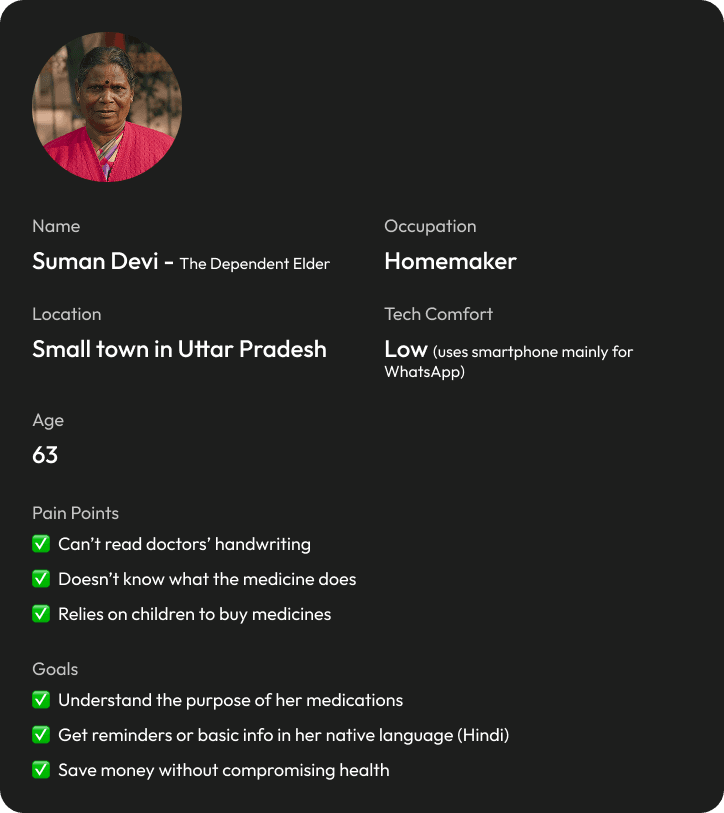
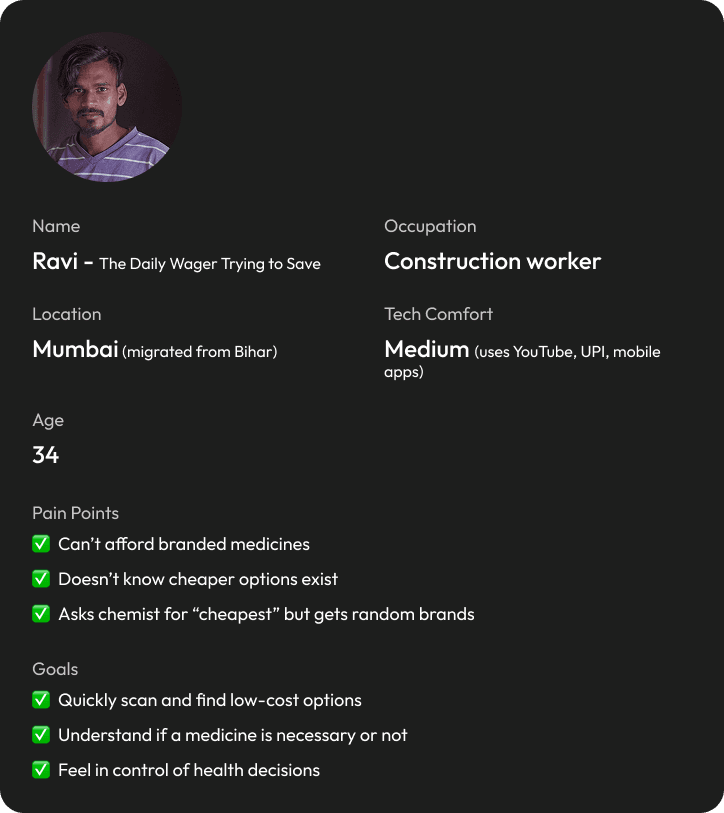
Blind Trust Without Understanding
Users take medicines because they’re told to — not because they understand them.
“Doctor ne likha hai, lena padega.”
This creates dependency, not confidence.
If something goes wrong, users don’t know what to question.
Design implication: The app must educate without challenging authority.
Fear of Doing Something Wrong
Users worry:
“What if I take the wrong medicine?”
“What if the generic one is weaker?”
“What if I stop this medicine?”
This fear stops them from asking questions or exploring alternatives.
Design implication: Reassurance and trust signals matter more than features.
Medicine Names Are Meaningless
To users:
Paracetamol
Atorvastatin
Pantoprazole
All sound the same.
They don’t map to outcomes like pain relief, heart protection, or stomach safety.
Design implication: Translate medicine → purpose → benefit.
Language & Literacy Gap
Even educated users struggle because:
Prescriptions are in English
Explanations are medical
Local language support is missing
Design implication: Language is not an add-on; it’s core UX.
No One Explains “Why”
Doctors explain what to take, not why.
Pharmacists explain how to take, not what it does.
That gap leaves users anxious and uninformed.
Design implication: “Why” is the emotional unlock.
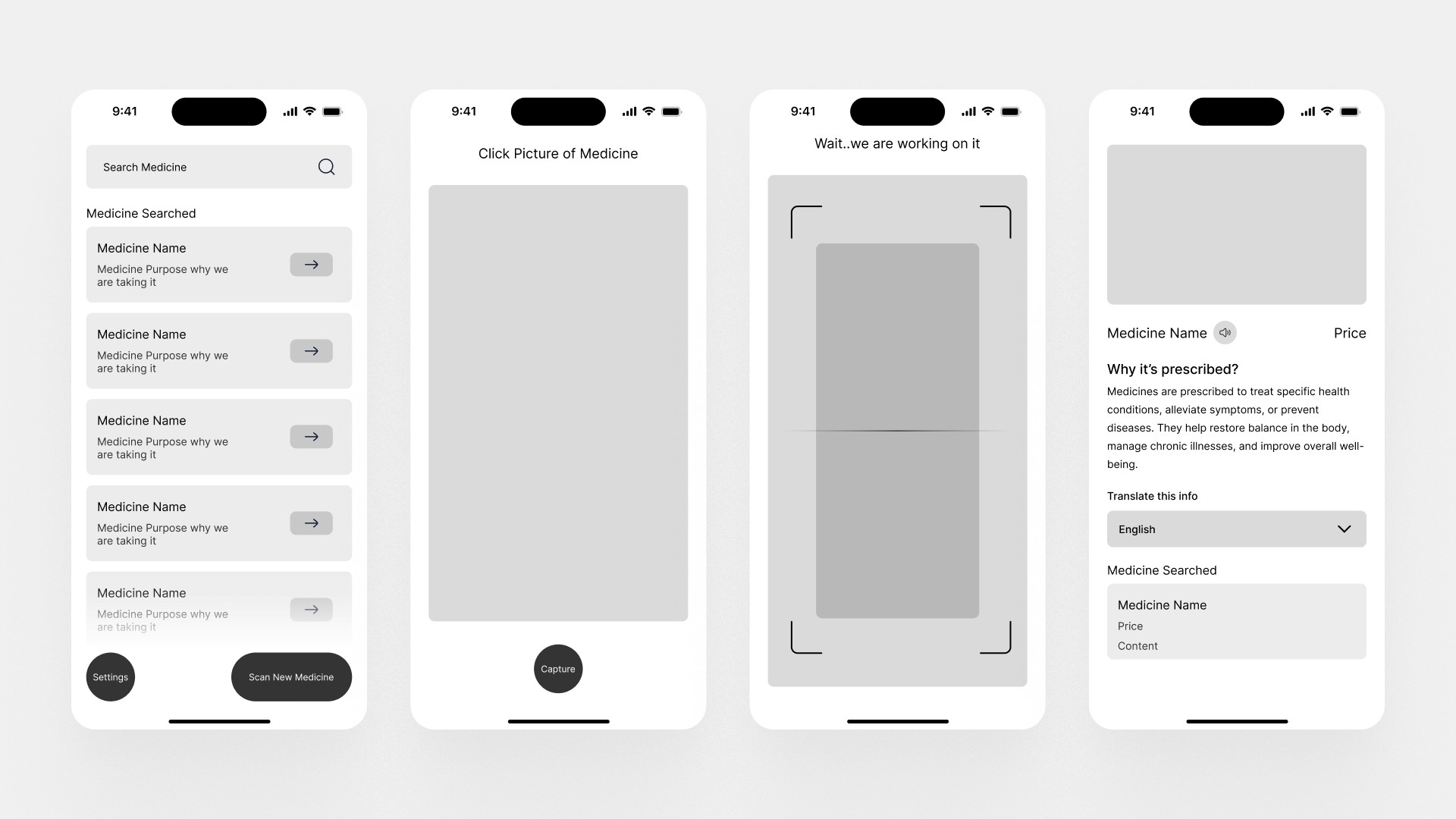
Early wireframes aid in comprehending necessary data points, determining valuable information for users, and enhancing the overall user experience with meaningful content integration.
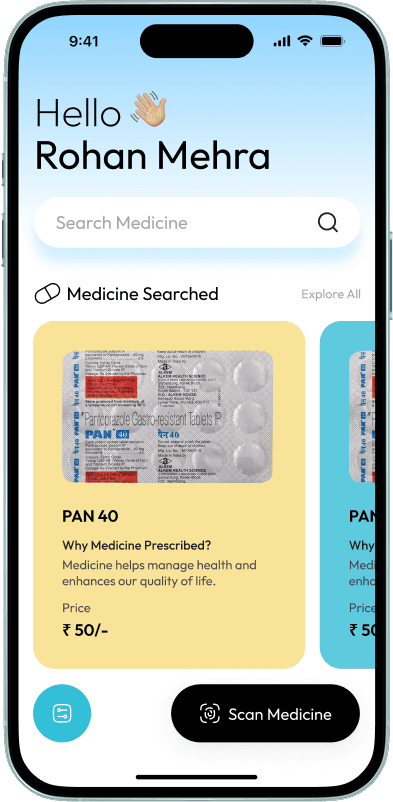
This represents the final visual design of the Medhelp application, transitioning from low-fidelity wireframes to high-fidelity designs for user testing and evaluation.
Design Approach
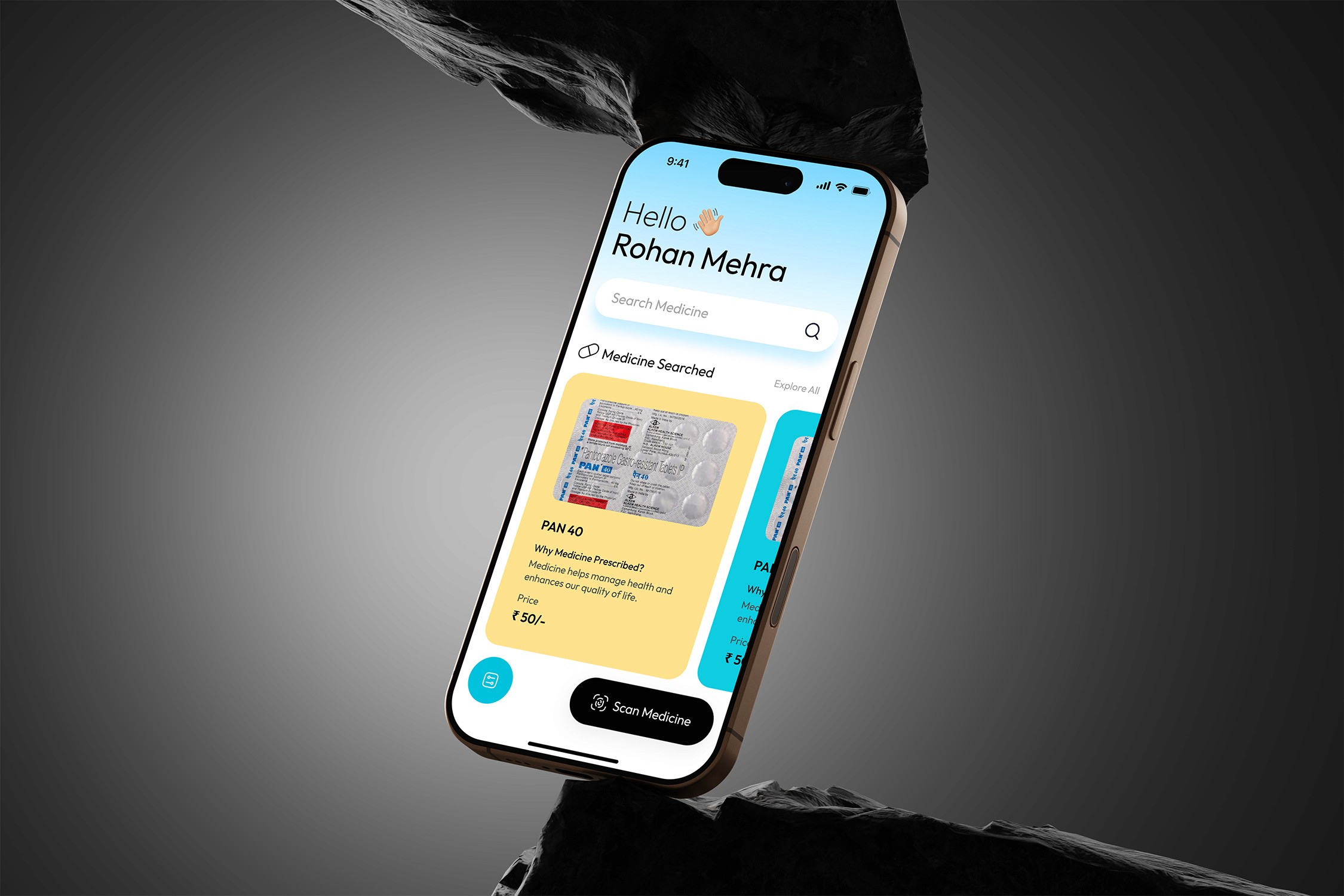
The home screen prioritizes speed, clarity, and accessibility, especially for users who may not remember or correctly read medicine names.
A primary search bar is placed at the top to support direct name-based queries. For cases where the medicine name is unclear, a secondary but equally important “Scan Medicine” action is provided. This action is positioned at the bottom of the screen within the natural thumb reach zone, enabling comfortable one-handed usage.
To reduce repeated effort, recent searches are surfaced prominently, allowing users to revisit previously identified medicines without re-entering information.
Search results are presented as medicine cards, designed for rapid comprehension. Each card includes:
A visual reference of the medicine for recognition
The medicine name
A plain-language explanation of why it was prescribed
Price information for transparency
Outcome
This layout minimizes user friction, supports multiple entry points (search or scan), and allows users to understand critical medicine information at a glance—without navigating through multiple screens.
Goal
Enable users to quickly identify a medicine and understand its purpose with minimal effort and cognitive load.
Design Approach
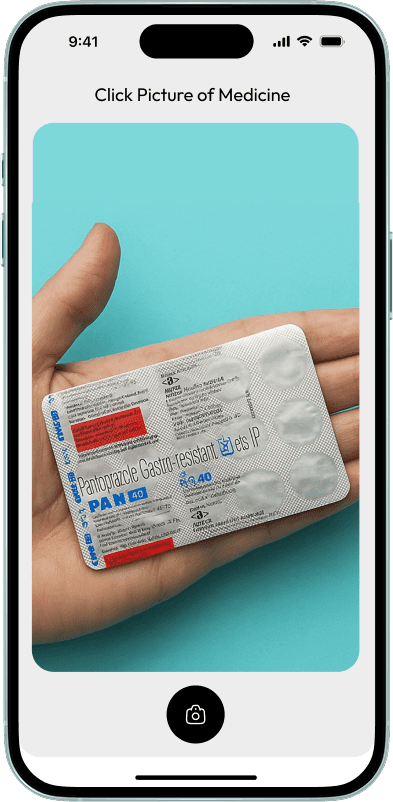
The Medicine Scanner screen is the primary entry point for image-based identification and is accessed via the “Scan Medicine” CTA on the home screen.
Upon entry, the camera is automatically activated to reduce user effort and eliminate unnecessary steps. The interface guides users to capture a clear image of the medicine wrapper, ensuring reliable detection and higher recognition accuracy.
Once a clear image is captured, the system processes the scan and identifies the medicine, transitioning users seamlessly to the results flow without additional confirmation steps.
Outcome
This flow minimizes friction, reduces input errors caused by manual typing, and enables fast, accurate medicine identification—particularly for users with low literacy or unclear prescriptions.
Goal
Allow users to accurately identify a medicine when the name is unknown or unreadable.
Design Approach
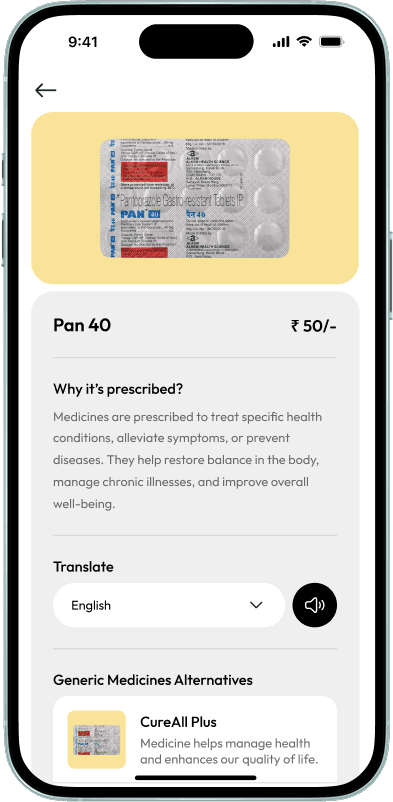
After a successful scan, users land on the Medicine Details screen, which surfaces all critical information in a single, scannable view.
At the top, the medicine image and name provide immediate confirmation, followed by price information to establish cost transparency early in the flow. This addresses a key user concern—understanding affordability before taking action.
The “Why it’s prescribed” section explains the medicine’s use in plain, non-clinical language, reducing dependency on external sources and improving comprehension for users with limited medical knowledge.
To improve accessibility, the screen includes a language translation control, allowing users to switch content into their preferred language. A pronunciation (audio) button enables users to listen to the medicine name and explanation, making it easier to communicate or recommend the medicine to caregivers, pharmacists, or family members.
Below the primary information, generic medicine alternatives are presented to support cost-effective decision-making. Each alternative is shown with a brief description to help users evaluate options without leaving the screen.
Outcome
This screen consolidates education, accessibility, and affordability into a single experience—empowering users to understand their medication, communicate it confidently, and explore safer, more affordable alternatives.
Goal
Help users clearly understand a medicine’s purpose, cost, and alternatives, while improving accessibility and informed decision-making.
Design Approach
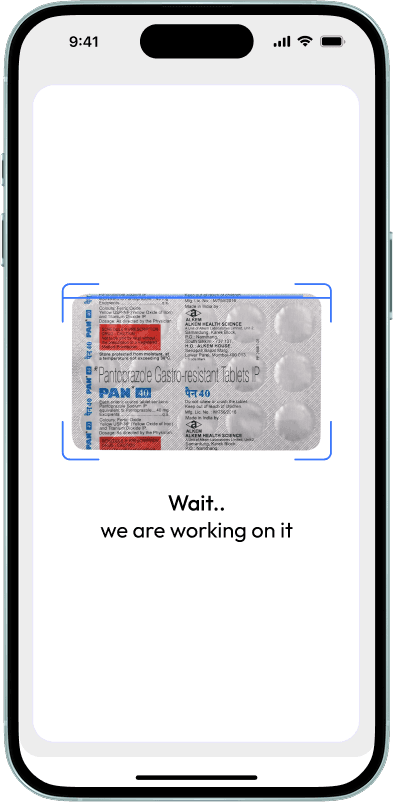
Once a user captures an image of the medicine wrapper, the interface transitions into a processing state. The scanned image remains visible within a defined frame to reinforce continuity and confirm that the correct input has been captured.
A simple, human-centered status message—“Wait… we are working on it”—communicates system activity without introducing technical jargon. This reassurance reduces uncertainty and prevents premature user actions, such as rescanning or exiting the flow.
The screen intentionally minimizes visual noise during processing, allowing users to focus on a single task state while the system performs recognition in the background.
Outcome
This feedback-driven state builds trust, reduces perceived waiting time, and clearly signals progress—ensuring users remain engaged until the scan results are ready.
Goal
Provide clear system feedback while the medicine is being analyzed, ensuring users feel confident that the scan is in progress.